
Fast, Offline Batch
File Conversion.
100% offline desktop converter. Process hundreds of images, audio tracks, videos, and documents in seconds with zero cloud uploads or subscription fees.
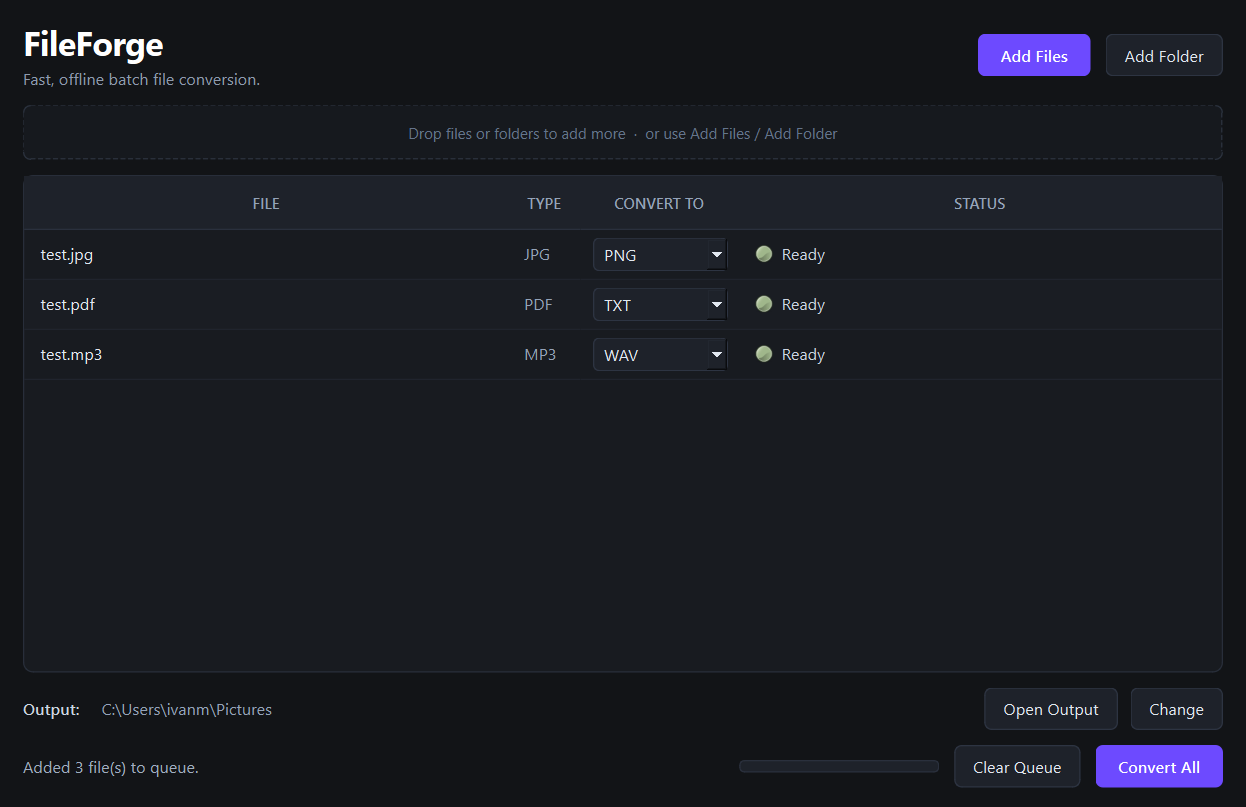
Engineered For Efficiency
Everything you need. Nothing you don't.
100% Offline & Private
No server uploads, cloud queues, or file size limits. Your sensitive documents, images, and videos stay strictly on your local machine.
Multi-Threaded Speed
Utilizes all CPU cores to convert hundreds of files concurrently in seconds. Say goodbye to waiting for online web tools to upload.
Smart Format Detection
FileForge automatically parses dropped files and suggests optimal target extensions and codecs for maximum compression and clarity.
Native & Lightweight
Built with native GUI libraries instead of heavy browser wrappers. Instant startup, under 50MB RAM footprint, dark mode tuned.
Unmatched Versatility
20+ Popular Formats Supported
Images
Audio
Video
Documents & Data
Got Questions?
Frequently Asked Questions
Is FileForge really 100% offline?
Yes, absolutely. FileForge runs entirely on your local CPU/GPU using native compiled binaries. No internet connection is required after downloading, and zero byte of your files ever leaves your computer.
How many files can I convert at once?
There are no arbitrary batch limits or file size caps. You can drag and drop entire directories containing thousands of files, and FileForge will queue and process them concurrently using worker threads.
What desktop platforms are supported?
FileForge runs natively on Windows 10/11. macOS and Linux coming soon!
Is this a monthly subscription?
No. FileForge is a one-time purchase. Buy it once on Gumroad and enjoy lifetime desktop updates with no hidden fees or monthly charges.
Ready for Frictionless File Conversion?
Take full control over your digital assets. Get lifetime access to FileForge today.
Instant digital download via Gumroad • 100% money-back guarantee